Lifecycle Operating Model
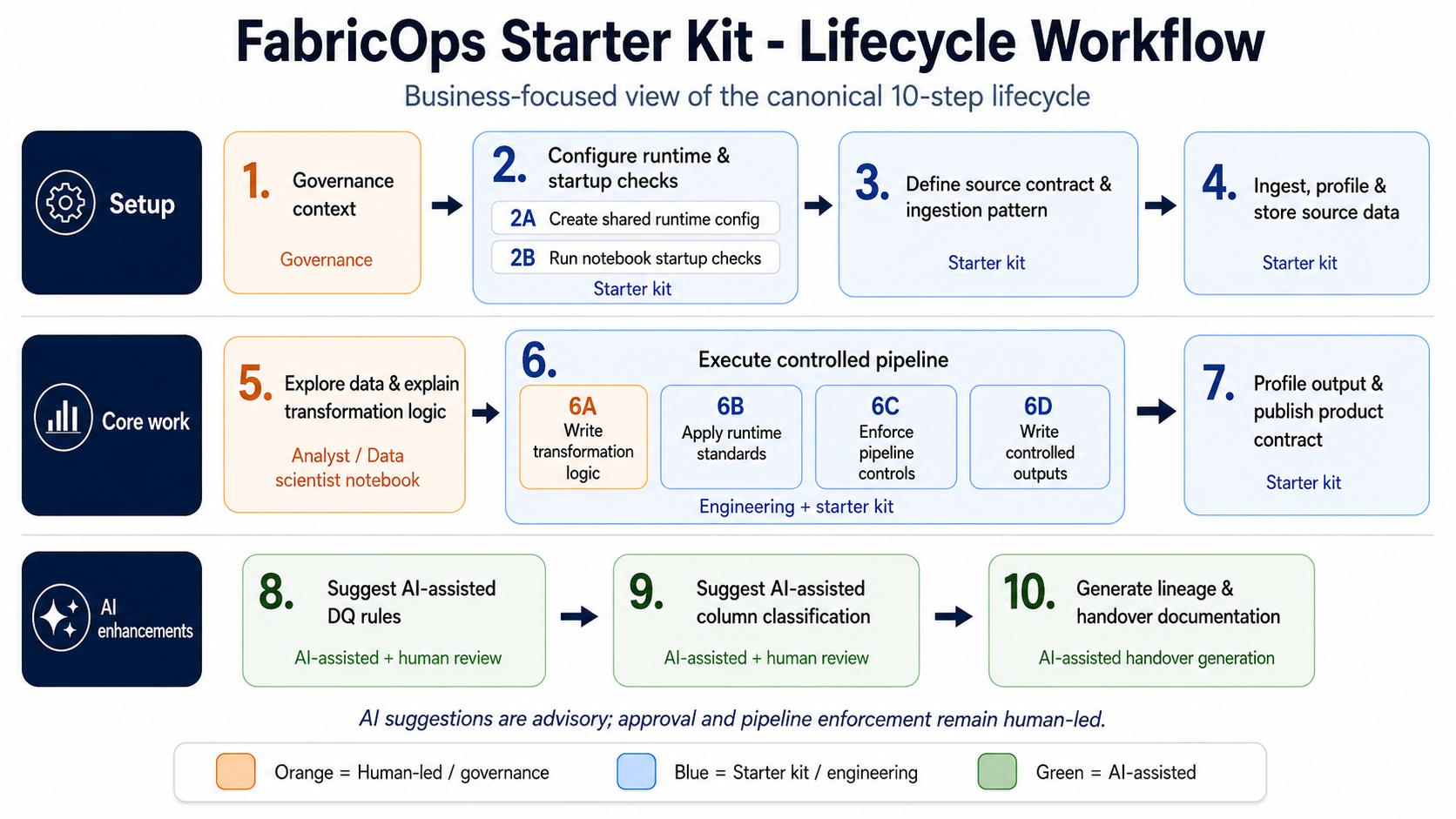
FabricOps Starter Kit uses a 10-step lifecycle as a business operating model for data products in Microsoft Fabric. It is not only a notebook sequence: it connects governance intent, source expectations, transformation controls, and handover obligations from start to finish.
The lifecycle moves a product from governed agreement, to source contract, to ingestion and profiling, to exploration, to controlled pipeline execution, to output contract, to AI-assisted suggestions, and finally to lineage and handover documentation.
10-step business operating model
Step 1: Governance context
This step captures the approved usage, owner, and data agreement before technical work begins. The agreement may live outside Fabric, such as in SharePoint documents, but the data product should stay tied to that approved business context throughout the lifecycle.
Step 2A: Create shared runtime config
This step defines the shared project setup, including environment paths, workspace targets, AI availability, and standard naming rules. The goal is to define the setup once so exploration and pipeline notebooks do not depend on hidden manual configuration.
Step 2B: Run notebook startup checks
This step confirms that every exploration or pipeline notebook starts from a known valid state. The notebook should be running in the expected environment, follow naming rules, and have the required Fabric or AI capabilities before any data work begins.
Step 3: Define source contract & ingestion pattern
This step defines the contract between the upstream source and the data product. It captures the expected schema, data types, update frequency, update method, watermark column, and whether the source is append only, overwritten, or slowly changing, so the correct ingestion and comparison pattern can be chosen.
Step 4: Ingest, profile & store source data
This step brings the source data into the framework, profiles it, and stores the raw or source-aligned version. The goal is to preserve evidence of what arrived before business transformation begins.
Step 5: Explore data & explain transformation logic
This step is where the analyst studies the profiled source data and explains why transformation is needed. The goal is to document findings, assumptions, and business reasoning before the logic becomes part of a repeatable pipeline.
Step 6A: Write transformation logic
This step defines the main logic that converts source-aligned data into the target output. The goal is to make the transformation consistent across development, testing, and scheduled refresh.
Step 6B: Apply runtime standards
This step applies standard runtime requirements such as technical columns, run IDs, timestamps, partition keys, and repeatable audit conventions. The goal is to make the output easier to audit, troubleshoot, and operate at scale.
Step 6C: Enforce pipeline controls
This step enforces approved pipeline controls that are available at runtime and determine whether output should be trusted. This includes approved data quality rules, schema checks, contract checks, and approved classification or sensitivity checks before release downstream.
Step 6D: Write controlled outputs
This step writes the transformed output to the correct lakehouse, warehouse, or product layer. The goal is to make the write pattern explicit, repeatable, and aligned to the intended environment instead of relying on ad hoc exports.
Step 7: Profile output & publish product contract
This step profiles the created output, stores its metadata, and creates the data contract for the next notebook, pipeline, or consumer. The goal is to record what was produced and make the output understandable and reusable downstream.
Step 8: Suggest AI assisted data quality rules
This step uses AI in exploration notebooks to suggest possible data quality rules from profiling results, business context, and source knowledge. These suggestions are advisory only; the actual rule creation, approval, and enforcement happen later through human review and pipeline implementation.
Step 9: Suggest AI assisted column classification
This step uses AI in exploration notebooks to suggest column classifications such as PII, sensitivity level, and governance labels for the planned output. These suggestions are advisory only; actual label assignment must be approved by governance or data stewards and enforced in the pipeline.
Step 10: Generate lineage & AI assisted handover documentation
This step creates the final documentation needed for review, handover, and future maintenance. The goal is for another analyst, engineer, approver, or stakeholder to understand what was built, why it was built, and how to operate it.
AI boundary and accountability
- AI suggestions happen in exploration notebooks.
- Step 8 and Step 9 are advisory only.
- Humans, governance owners, and data stewards approve.
- Human engineers enforce approved rules and labels in pipeline notebooks.
- AI does not directly approve or enforce governance controls.